> ## Documentation Index
> Fetch the complete documentation index at: https://docs.e-invoice.be/llms.txt
> Use this file to discover all available pages before exploring further.
# API Reference
> Complete reference for the e-invoice.be API
## Overview
The e-invoice.be API enables you to create, send, and manage Peppol-compliant e-invoices and credit notes. All invoices are automatically converted to UBL BIS Billing 3.0 format and transmitted via the Peppol network.
## Base URL
e-invoice.be runs on a single API host:
```
https://api.e-invoice.be
```
**Testing without Peppol**: There is no separate staging or development host. To test without touching the Peppol network, use a **sandbox company** (a workspace in test mode). In test mode, documents are delivered as UBL XML attachments to the `company_email` address instead of being transmitted over Peppol, and inbound documents are simulated — perfect for testing without affecting real recipients.
Learn about test mode and sandbox companies
## Authentication
All API requests require authentication using an API key in the `Authorization` header:
```bash theme={null}
curl -X GET "https://api.e-invoice.be/api/documents/" \
-H "Authorization: Bearer YOUR_API_KEY"
```
See the [Authentication guide](/authentication) for details on obtaining and using API keys.
## API Structure
The e-invoice.be API is organized into several main sections:
### Documents
Create, manage, and send invoices and credit notes via Peppol.
**Key Endpoints:**
* `POST /api/documents/` - Create a new document
* `GET /api/documents/{id}` - Get document details
* `POST /api/documents/{id}/send` - Send document via Peppol
* `DELETE /api/documents/{id}` - Delete a document
To list documents, use `GET /api/outbox/` (sent documents) and `GET /api/inbox/` (received documents).
**Schemas:**
* [Document](/api-reference/schemas/document) - Invoice and credit note structure
* [LineItem](/api-reference/schemas/line-item) - Line item structure
**Related Guides:**
* [Creating Invoices](/guides/creating-invoices)
* [Credit Notes](/guides/credit-notes)
* [Advanced Invoicing](/guides/advanced-invoicing)
### Validation
Validate invoice JSON or UBL XML before creating documents.
**Key Endpoints:**
* `POST /api/validate/json` - Validate JSON invoice data
* `POST /api/validate/ubl` - Validate UBL XML
* `GET /api/validate/peppol-id` - Verify Peppol participant ID
**Related Guides:**
* [Validation Guide](/guides/validation)
* [Lookup Participants](/guides/lookup-participants)
### Inbox
Receive and manage incoming invoices from other Peppol participants.
**Key Endpoints:**
* `GET /api/inbox/` - List received documents
* `GET /api/inbox/invoices` - List received invoices
* `GET /api/inbox/credit-notes` - List received credit notes
Retrieve the full details of any received document with `GET /api/documents/{id}`.
### Lookup
Search for Peppol participants and verify their registration status.
**Key Endpoints:**
* `GET /api/lookup/participants` - Search for participants
* `GET /api/lookup` - Get participant details
**Related Guides:**
* [Lookup Participants](/guides/lookup-participants)
### Alternative Formats
Create documents from UBL XML or PDF files.
**Key Endpoints:**
* `POST /api/documents/ubl` - Create from UBL XML
* `POST /api/documents/pdf` - Create from PDF (with metadata)
**Related Guides:**
* [UBL Documents](/guides/ubl-documents)
* [PDF Documents](/guides/pdf-documents)
### Webhooks
Configure webhook endpoints to receive real-time notifications about document events.
**Key Endpoints:**
* `GET /api/webhooks/` - List webhook subscriptions
* `POST /api/webhooks/` - Create webhook subscription
* `DELETE /api/webhooks/{id}` - Delete webhook subscription
**Related Guides:**
* [Webhooks](/essentials/webhooks)
## Admin API (Resellers Only)
For resellers and service providers managing multiple customer organizations, we provide a separate **Admin API** with organization-level capabilities:
* **Tenant Management** - Create and manage customer organizations
* **API Key Provisioning** - Generate API keys for customers
* **Peppol Registration** - Register customers on the Peppol network
* **Credential Rotation** - Manage API keys without customer involvement
The Admin API requires an **organization API key** and is only available to approved reseller partners.
Complete guide to the Admin API for managing customer tenants (resellers only)
Learn more about our [Reseller Programme](/reseller-programme).
## Request & Response Format
### Request Format
All requests use JSON format:
```bash theme={null}
curl -X POST "https://api.e-invoice.be/api/documents/" \
-H "Authorization: Bearer YOUR_API_KEY" \
-H "Content-Type: application/json" \
-d '{
"document_type": "INVOICE",
"invoice_id": "INV-2024-001",
"invoice_date": "2024-10-24",
"currency": "EUR",
"vendor_name": "Your Company BVBA",
"vendor_tax_id": "BE0123456789",
"customer_name": "Customer Company NV",
"customer_tax_id": "BE0987654321",
"items": [
{
"description": "Professional Services",
"quantity": 10,
"unit": "C62",
"unit_price": 100.00,
"tax_rate": "21.00"
}
]
}'
```
### Response Format
Successful responses return JSON with a 2xx status code:
```json theme={null}
{
"id": "doc_abc123",
"document_type": "INVOICE",
"state": "DRAFT",
"invoice_id": "INV-2024-001",
"created_at": "2024-10-24T10:00:00Z",
"updated_at": "2024-10-24T10:00:00Z"
}
```
### Error Responses
Errors return JSON with an appropriate HTTP status code:
```json theme={null}
{
"detail": "Invalid authentication credentials"
}
```
Common status codes:
* `400 Bad Request` - Invalid request data
* `401 Unauthorized` - Missing or invalid API key
* `404 Not Found` - Resource not found
* `422 Unprocessable Entity` - Validation error
* `429 Too Many Requests` - Rate limit exceeded
* `500 Internal Server Error` - Server error
## Pagination
Document list endpoints (inbox and outbox) support pagination with `page` and `page_size` parameters:
```bash theme={null}
GET /api/outbox/?page=1&page_size=20
```
**Parameters:**
* `page` - Page number (default: 1)
* `page_size` - Number of items per page (default: 20, max: 100)
**Response:**
```json theme={null}
{
"items": [...],
"total": 250,
"page": 1,
"page_size": 20,
"pages": 13,
"has_next_page": true
}
```
The Admin API list endpoints (`/api/admin/tenants` and its API-key routes) use `skip` and `limit` parameters instead. See the [Admin API documentation](/admin-api).
## Rate Limiting
Write and validation endpoints are rate-limited **per API key** to ensure service quality. The limit applies to:
* `POST /api/validate/json` and `POST /api/validate/ubl`
* `POST /api/documents/` and `POST /api/documents/ubl`
These endpoints allow up to **60 requests per 60 seconds** per API key. PDF conversion is subject to a tighter limit (a few requests per minute) because it is more resource-intensive. Read endpoints (such as `GET /api/documents/{id}`, inbox, and outbox) are not rate-limited.
Exceeding a limit returns `429 Too Many Requests` with a `Retry-After` header indicating the number of seconds to wait before retrying. Clients should honor `Retry-After` and use exponential backoff.
## Document States
Documents progress through different states:
| State | Description |
| ---------- | ---------------------------- |
| `DRAFT` | Created but not sent |
| `TRANSIT` | Being transmitted via Peppol |
| `SENT` | Successfully delivered |
| `FAILED` | Transmission failed |
| `RECEIVED` | Received from another party |
### Outbound Document Flow
Documents you create and send follow this state progression:
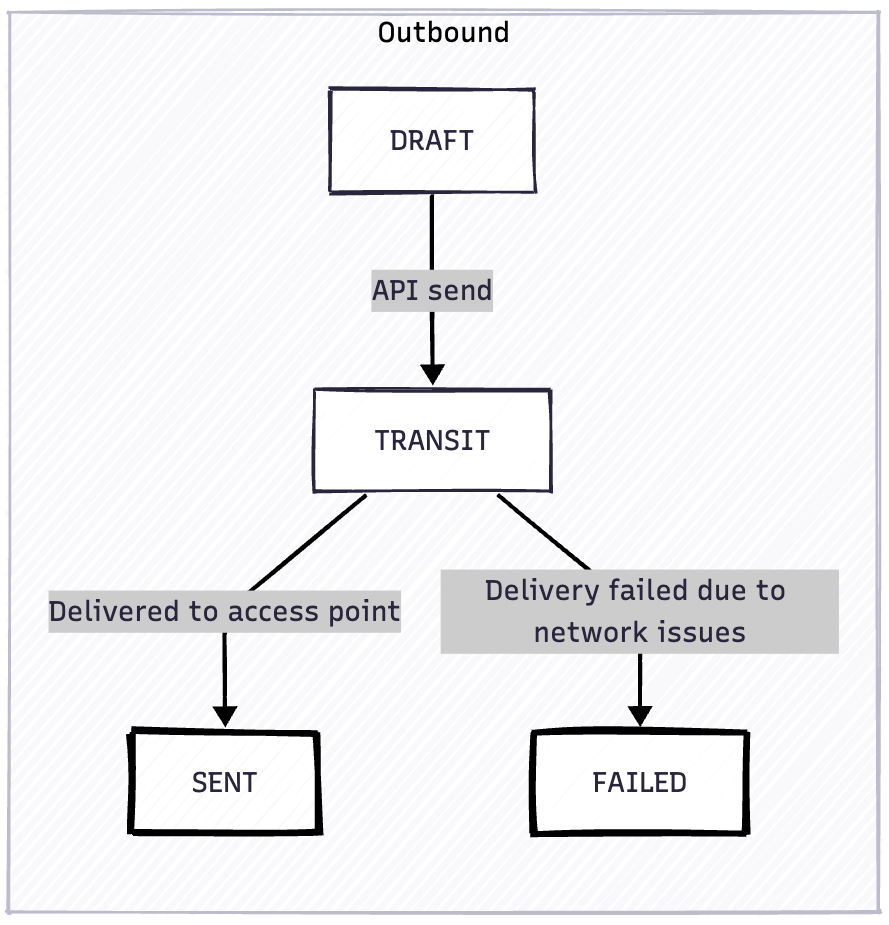 **Automatic Retry Strategy**: Documents in `TRANSIT` state use an exponential backoff strategy with 10 retry attempts before transitioning to `FAILED`. Retry delays are: 1, 2, 4, 8, 16, 32, 64, 128, 256, and 360 minutes (final retry capped at 6 hours). This ensures maximum delivery success even during temporary network issues or recipient downtime.
**Manual Retry**: Documents in `FAILED` state can be retried by calling `POST /api/documents/{id}/send` again, which will transition them back to `TRANSIT` for another delivery attempt.
**Coming soon**: Detailed transmission attempt history will be available in a future release, allowing you to view all retry attempts, timestamps, and failure reasons for each transmission.
### Inbound Document Flow
Documents received from other Peppol participants:
**Automatic Retry Strategy**: Documents in `TRANSIT` state use an exponential backoff strategy with 10 retry attempts before transitioning to `FAILED`. Retry delays are: 1, 2, 4, 8, 16, 32, 64, 128, 256, and 360 minutes (final retry capped at 6 hours). This ensures maximum delivery success even during temporary network issues or recipient downtime.
**Manual Retry**: Documents in `FAILED` state can be retried by calling `POST /api/documents/{id}/send` again, which will transition them back to `TRANSIT` for another delivery attempt.
**Coming soon**: Detailed transmission attempt history will be available in a future release, allowing you to view all retry attempts, timestamps, and failure reasons for each transmission.
### Inbound Document Flow
Documents received from other Peppol participants:
 Track state changes via [webhooks](/essentials/webhooks) or by polling the document endpoint.
## Supported Currencies
The API supports the following ISO 4217 currency codes:
`EUR`, `USD`, `GBP`, `JPY`, `CHF`, `CAD`, `AUD`, `NZD`, `CNY`, `INR`, `SEK`, `NOK`, `DKK`, `SGD`, `HKD`
Default: `EUR`
## Peppol Participant IDs
Peppol IDs use the format `scheme:identifier`:
**Common schemes:**
* Belgium: `0208:0123456789` (CBE number)
* Netherlands: `0106:12345678` (KVK number)
* Germany: `0204:DE123456789` (VAT number)
* France: `0009:12345678901234` (SIRET)
See the complete [Peppol ID schemes list](https://docs.peppol.eu/edelivery/codelists/v9.4/Peppol%20Code%20Lists%20-%20Participant%20identifier%20schemes%20v9.4.html).
## Getting Started
Get started in 5 minutes
Set up API authentication
Learn how to create e-invoices
Validate before sending
## OpenAPI Specification
The complete OpenAPI specification is available at:
```
https://api.e-invoice.be/api/openapi.json
```
You can use this specification to:
* Generate client libraries in your programming language
* Import into API testing tools (Postman, Insomnia, etc.)
* Validate request/response structures
**Prefer using the API from an AI assistant?** Connect Claude, ChatGPT, Cursor, or VS Code directly to your e-invoice.be account via MCP. See [MCP setup →](/essentials/mcp)
## Need Help?
Contact our support team
View our open-source projects
Track state changes via [webhooks](/essentials/webhooks) or by polling the document endpoint.
## Supported Currencies
The API supports the following ISO 4217 currency codes:
`EUR`, `USD`, `GBP`, `JPY`, `CHF`, `CAD`, `AUD`, `NZD`, `CNY`, `INR`, `SEK`, `NOK`, `DKK`, `SGD`, `HKD`
Default: `EUR`
## Peppol Participant IDs
Peppol IDs use the format `scheme:identifier`:
**Common schemes:**
* Belgium: `0208:0123456789` (CBE number)
* Netherlands: `0106:12345678` (KVK number)
* Germany: `0204:DE123456789` (VAT number)
* France: `0009:12345678901234` (SIRET)
See the complete [Peppol ID schemes list](https://docs.peppol.eu/edelivery/codelists/v9.4/Peppol%20Code%20Lists%20-%20Participant%20identifier%20schemes%20v9.4.html).
## Getting Started
Get started in 5 minutes
Set up API authentication
Learn how to create e-invoices
Validate before sending
## OpenAPI Specification
The complete OpenAPI specification is available at:
```
https://api.e-invoice.be/api/openapi.json
```
You can use this specification to:
* Generate client libraries in your programming language
* Import into API testing tools (Postman, Insomnia, etc.)
* Validate request/response structures
**Prefer using the API from an AI assistant?** Connect Claude, ChatGPT, Cursor, or VS Code directly to your e-invoice.be account via MCP. See [MCP setup →](/essentials/mcp)
## Need Help?
Contact our support team
View our open-source projects