> ## Documentation Index
> Fetch the complete documentation index at: https://docs.e-invoice.be/llms.txt
> Use this file to discover all available pages before exploring further.
# Creating E-Invoices
> Learn how to create and send e-invoices via the Peppol network
## Overview
The e-invoice.be API allows you to create invoices and credit notes that comply with the European e-invoicing standard (EN 16931) and transmit them via the Peppol network.
## Before You Start
**Use a sandbox company for development and testing.** A sandbox company runs in test mode, so documents are emailed instead of being sent via Peppol, allowing you to safely test your integration. Create one from [app.e-invoice.be](https://app.e-invoice.be) and use its API key. [Learn more about test mode →](/environments)
## Workflow
Creating and sending an e-invoice involves these steps:
1. **Validate** your JSON invoice data (required during development)
2. **Create** the document - only valid invoices can be created
3. **Send** the document via Peppol (or email if test mode is enabled)
You must validate your invoice JSON **before** creating a document. The API only accepts invoices that can be converted into valid UBL BIS Billing 3.0 format. Use `/api/validate/json` during development to test your payload.
## Step 1: Validate Your Invoice Data (Required)
Before creating an invoice, validate your JSON payload using `POST /api/validate/json`.
```bash theme={null}
curl -X POST "https://api.e-invoice.be/api/validate/json" \
-H "Authorization: Bearer YOUR_API_KEY" \
-H "Content-Type: application/json" \
-d '{
"document_type": "INVOICE",
"invoice_id": "INV-2024-001",
"invoice_date": "2024-10-24",
"due_date": "2024-11-24",
"currency": "EUR",
"purchase_order": "PO-12345",
"vendor_name": "E-INVOICE BV",
"vendor_tax_id": "BE1018265814",
"vendor_address": "Brusselsesteenweg 119/A, 1980 Zemst, Belgium",
"vendor_email": "billing@e-invoice.be",
"customer_name": "OpenPeppol VZW",
"customer_tax_id": "BE0848934496",
"customer_address": "Robert Schumainplein 6 bus 5, 1040 Brussel, Belgium",
"items": [
{
"description": "Professional Services",
"quantity": 10,
"unit": "C62",
"unit_price": 100.00,
"amount": 1000.00,
"tax_rate": "21.00"
}
],
"payment_term": "Payment due within 30 days",
"payment_details": [
{
"iban": "BE68539007547034",
"swift": "GEBABEBB",
"payment_reference": "INV-2024-001"
}
]
}'
```
### Validation Response
**Success - Ready to create:**
```json theme={null}
{
"id": "val_...",
"is_valid": true,
"issues": []
}
```
**Validation errors:**
```json theme={null}
{
"id": "val_...",
"is_valid": false,
"issues": [
{
"message": "Invalid tax ID format. Expected format: country code + number (e.g., BE1018265814 for Belgium)",
"type": "error",
"location": "vendor_tax_id"
},
{
"message": "Invalid tax rate format. Must be a percentage string (e.g., '21.00')",
"type": "error",
"location": "items[0].tax_rate"
}
]
}
```
Use `/api/validate/json` extensively during development. This endpoint does not create any documents - it only validates that your JSON can be converted to valid UBL format. See the [Validation Guide](/guides/validation) for more details.
## Step 2: Create the Invoice
Once validation passes, use the **exact same JSON payload** with `POST /api/documents/`.
```bash theme={null}
curl -X POST "https://api.e-invoice.be/api/documents/" \
-H "Authorization: Bearer YOUR_API_KEY" \
-H "Content-Type: application/json" \
-d '{
"document_type": "INVOICE",
"invoice_id": "INV-2024-001",
"invoice_date": "2024-10-24",
"due_date": "2024-11-24",
"currency": "EUR",
"purchase_order": "PO-12345",
"vendor_name": "E-INVOICE BV",
"vendor_tax_id": "BE1018265814",
"vendor_address": "Brusselsesteenweg 119/A, 1980 Zemst, Belgium",
"vendor_email": "billing@e-invoice.be",
"customer_name": "OpenPeppol VZW",
"customer_tax_id": "BE0848934496",
"customer_address": "Robert Schumainplein 6 bus 5, 1040 Brussel, Belgium",
"items": [
{
"description": "Professional Services",
"quantity": 10,
"unit": "C62",
"unit_price": 100.00,
"amount": 1000.00,
"tax_rate": "21.00"
}
],
"payment_term": "Payment due within 30 days",
"payment_details": [
{
"iban": "BE68539007547034",
"swift": "GEBABEBB",
"payment_reference": "INV-2024-001"
}
]
}'
```
### Response
```json theme={null}
{
"id": "doc_abc123",
"document_type": "INVOICE",
"state": "DRAFT",
"invoice_id": "INV-2024-001",
"invoice_date": "2024-10-24",
"invoice_total": 1210.00,
"total_tax": 210.00,
"created_at": 1729468923,
"updated_at": 1729468923
}
```
## Understanding the Invoice Structure
### Required Fields
Only the `items` array is strictly required. All other fields are optional but recommended for complete invoices:
| Field | Description | Required |
| --------------- | -------------------------------------------------------- | --------------------- |
| `items` | Array of invoice line items | **Yes** (min 1) |
| `document_type` | Document type: `INVOICE`, `CREDIT_NOTE`, or `DEBIT_NOTE` | No (default: INVOICE) |
| `invoice_id` | Your unique invoice number | Recommended |
| `invoice_date` | Invoice date (ISO 8601: `YYYY-MM-DD`) | Recommended |
| `currency` | Currency code (e.g., `EUR`, `USD`, `GBP`) | No (default: EUR) |
### Vendor (Supplier) Fields
Information about your company (the seller):
| Field | Description | Example |
| ---------------- | ------------------ | ------------------------------------------------ |
| `vendor_name` | Your company name | `"E-INVOICE BV"` |
| `vendor_tax_id` | Your VAT/Tax ID | `"BE1018265814"` |
| `vendor_address` | Your full address | `"Brusselsesteenweg 119/A, 1980 Zemst, Belgium"` |
| `vendor_email` | Your contact email | `"billing@e-invoice.be"` |
The `vendor_tax_id` is your company's VAT or tax identification number (not the Peppol ID).
* For Belgian companies: Use the full VAT number including 'BE' prefix (e.g., `BE1018265814`)
* The API will automatically convert this to the appropriate Peppol ID format when transmitting via Peppol
### Customer Fields
Information about your customer (the buyer):
| Field | Description | Example |
| ------------------ | ---------------------- | ------------------------------------------------------- |
| `customer_name` | Customer company name | `"OpenPeppol VZW"` |
| `customer_tax_id` | Customer VAT/Tax ID | `"BE0848934496"` |
| `customer_address` | Customer full address | `"Robert Schumainplein 6 bus 5, 1040 Brussel, Belgium"` |
| `customer_email` | Customer contact email | `"info@openpeppol.org"` |
### Line Items
Each line item in the `items` array represents a product or service:
```json theme={null}
{
"description": "Product/Service description", // What is being sold
"quantity": 10, // Quantity
"unit": "C62", // Unit of measure (C62 = pieces/units)
"unit_price": 100.00, // Price per unit (excluding VAT)
"amount": 1000.00, // Line total (quantity × unit_price)
"tax_rate": "21.00" // VAT percentage as string
}
```
**Required item fields:**
* At least `description` or `unit_price` should be provided for meaningful invoices
**Common unit codes:**
* `C62` - Units/pieces
* `HUR` - Hours
* `DAY` - Days
* `MTR` - Meters
* `KGM` - Kilograms
**Tax rate format:**
* Must be a string representing a percentage
* Examples: `"21.00"`, `"6.00"`, `"0.00"`
* Standard Belgian VAT rates: `"21.00"` (standard), `"6.00"` (reduced), `"0.00"` (zero-rated)
### Optional Fields
```json theme={null}
{
"payment_term": "Net 30 days",
"payment_details": [
{
"iban": "BE68539007547034",
"swift": "GEBABEBB",
"payment_reference": "INV-2024-001"
}
]
}
```
```json theme={null}
{
"billing_address": "Billing Street 1, 1000 Brussels, Belgium",
"billing_address_recipient": "Accounts Payable Department",
"shipping_address": "Delivery Street 2, 2000 Antwerp, Belgium",
"shipping_address_recipient": "Warehouse Manager",
"service_address": "Service Location 3, 3000 Leuven, Belgium"
}
```
```json theme={null}
{
"allowances": [
{
"amount": 50.00,
"reason": "Early payment discount",
"tax_code": "S",
"tax_rate": "21.00"
}
],
"charges": [
{
"amount": 25.00,
"reason": "Shipping costs",
"tax_code": "S",
"tax_rate": "21.00"
}
]
}
```
See the [Advanced Invoicing Guide](/guides/advanced-invoicing) for more details.
```json theme={null}
{
"purchase_order": "PO-12345",
"note": "Thank you for your business"
}
```
## Step 3: Send the Document
Once your invoice is created, send it to the recipient using `POST /api/documents/{document_id}/send`.
```bash theme={null}
curl -X POST "https://api.e-invoice.be/api/documents/doc_abc123/send" \
-H "Authorization: Bearer YOUR_API_KEY"
```
### Response
```json theme={null}
{
"id": "doc_abc123",
"state": "TRANSIT",
"message": "Document queued for transmission"
}
```
### Peppol ID Routing
By default, the sender and receiver Peppol IDs are **automatically derived from the company identifiers** in your document:
* Derived from `vendor_tax_id` / `customer_tax_id` (VAT/tax number) OR `vendor_id` / `customer_id` (company registration number)
* For Belgian companies: Tax ID `BE1018265814` → Peppol ID `0208:1018265814`
* The `0208` scheme is mandatory for Belgian companies (required by Belgian government)
* This automatic conversion happens regardless of any endpoint IDs in UBL documents
**Belgian Peppol Requirement**: All Belgian companies must use the `0208` scheme with their enterprise number (CBE). This is automatically handled when you provide a Belgian tax ID starting with `BE`.
### Explicitly Specifying Peppol IDs (Recommended)
**Best Practice**: Always explicitly specify sender and receiver Peppol IDs using query parameters to ensure documents are routed to the correct endpoints. While automatic derivation works in most cases, explicit routing prevents delivery failures and ensures full control over transmission.
To send to a specific Peppol endpoint, explicitly set the Peppol IDs using query parameters:
```bash theme={null}
curl -X POST "https://api.e-invoice.be/api/documents/doc_abc123/send?sender_peppol_scheme=0208&sender_peppol_id=1018265814&receiver_peppol_scheme=0208&receiver_peppol_id=0848934496" \
-H "Authorization: Bearer YOUR_API_KEY"
```
**Available query parameters**:
| Parameter | Description | Example |
| ------------------------ | ---------------------------- | --------------- |
| `sender_peppol_scheme` | Sender's Peppol scheme ID | `0208` |
| `sender_peppol_id` | Sender's Peppol identifier | `1018265814` |
| `receiver_peppol_scheme` | Receiver's Peppol scheme ID | `0088` |
| `receiver_peppol_id` | Receiver's Peppol identifier | `1234567890123` |
**Common Peppol schemes**:
* `0208` - Belgian enterprise number (BE)
* `0088` - Global Location Number (GLN)
* `0106` - Dutch KVK
Always verify the recipient is registered at the specified Peppol endpoint before sending. Use `/api/validate/peppol-id?peppol_id=scheme:identifier` to confirm registration and prevent delivery failures.
### What Happens Next?
The behavior depends on whether test mode is enabled:
**Test mode disabled (production):**
* Document is transmitted via the Peppol network
* Recipient receives it in their official e-invoicing system
* Delivery confirmed via Access Point acknowledgments
**Test mode enabled (testing):**
* Document is converted to UBL XML
* UBL XML is sent via email to the address configured for your account
* No actual Peppol transmission occurs
* Perfect for testing without affecting real recipients
Test mode is delivered through a sandbox company. Create one from [app.e-invoice.be](https://app.e-invoice.be) for development, and use a separate regular company when you're ready to go live.
### Document States
| State | Description |
| ---------- | ----------------------------------- |
| `DRAFT` | Created but not sent |
| `TRANSIT` | Being transmitted (Peppol or email) |
| `SENT` | Successfully delivered to recipient |
| `FAILED` | Transmission failed |
| `RECEIVED` | Received from another party |
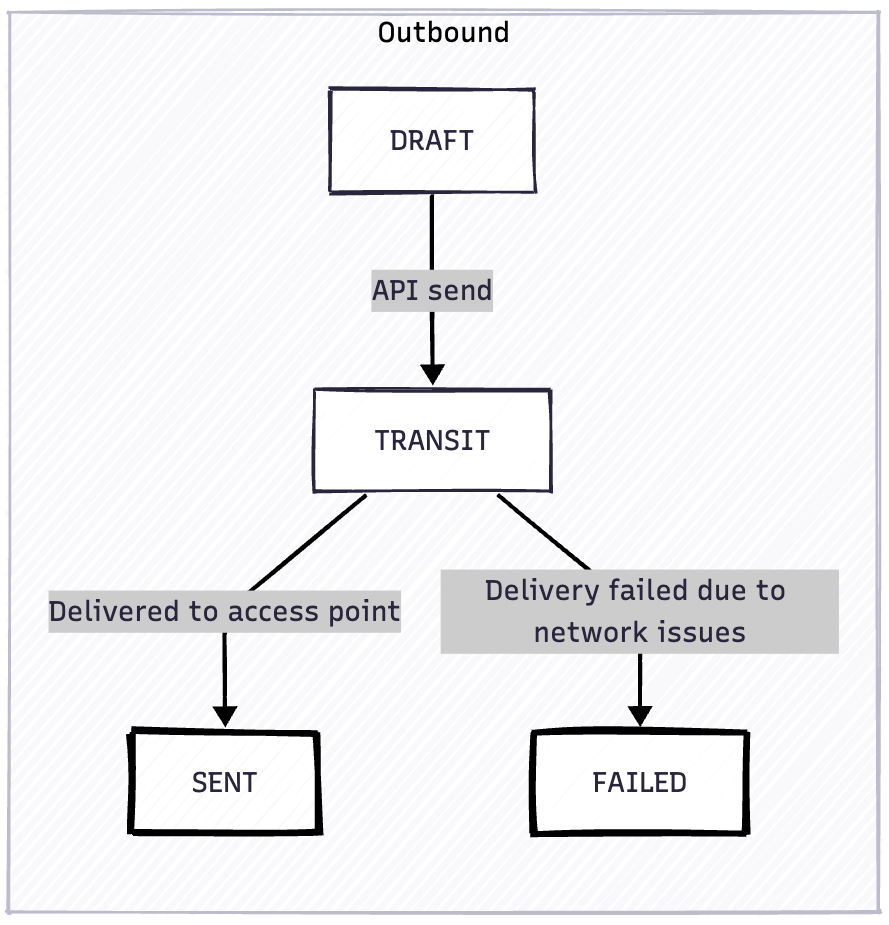 **Automatic Retries**: Documents in `TRANSIT` use an exponential backoff strategy with 10 retry attempts before transitioning to `FAILED`. Retry delays are: 1, 2, 4, 8, 16, 32, 64, 128, 256, and 360 minutes (final retry capped at 6 hours). This maximizes delivery success during temporary network issues.
**Manual Retry**: If a document reaches `FAILED` state, you can retry delivery by calling `POST /api/documents/{document_id}/send` again, which will transition it back to `TRANSIT` for another delivery attempt.
Track delivery status using webhooks or by polling `GET /api/documents/{document_id}`
**Coming soon**: Detailed transmission attempt history will be available in a future release, showing all retry attempts with timestamps and failure reasons.
## Complete Example
Here's a complete Node.js example:
```javascript theme={null}
const axios = require('axios');
// Most users should use the production API
const BASE_URL = 'https://api.e-invoice.be';
const api = axios.create({
baseURL: BASE_URL,
headers: {
'Authorization': `Bearer ${process.env.E_INVOICE_API_KEY}`,
'Content-Type': 'application/json'
}
});
async function createAndSendInvoice() {
const invoiceData = {
document_type: 'INVOICE',
invoice_id: 'INV-2024-001',
invoice_date: '2024-10-24',
due_date: '2024-11-24',
currency: 'EUR',
vendor_name: 'E-INVOICE BV',
vendor_tax_id: 'BE1018265814',
vendor_address: 'Brusselsesteenweg 119/A, 1980 Zemst, Belgium',
vendor_email: 'billing@e-invoice.be',
customer_name: 'OpenPeppol VZW',
customer_tax_id: 'BE0848934496',
customer_address: 'Robert Schumainplein 6 bus 5, 1040 Brussel, Belgium',
items: [
{
description: 'Professional Services',
quantity: 10,
unit: 'C62',
unit_price: 100.00,
amount: 1000.00,
tax_rate: '21.00'
}
],
payment_term: 'Net 30 days',
payment_details: [
{
iban: 'BE68539007547034',
swift: 'GEBABEBB',
payment_reference: 'INV-2024-001'
}
]
};
try {
// 1. Validate JSON (always do this during development)
const validation = await api.post('/api/validate/json', invoiceData);
if (!validation.data.is_valid) {
console.error('Validation failed:', validation.data.issues);
return;
}
console.log('✓ Invoice JSON is valid');
// 2. Create invoice (uses same payload)
const invoice = await api.post('/api/documents/', invoiceData);
console.log('✓ Invoice created:', invoice.data.id);
// 3. Send (via email if test mode enabled, Peppol if disabled)
const result = await api.post(`/api/documents/${invoice.data.id}/send`);
console.log('✓ Invoice sent:', result.data.state);
} catch (error) {
console.error('Error:', error.response?.data || error.message);
}
}
createAndSendInvoice();
```
If test mode is enabled on your account, this will email the UBL XML. If test mode is disabled, it will send via Peppol. Your code doesn't need to change - just the test mode setting on your account.
## Working with Credit Notes
Credit notes follow the same structure, but set `document_type: "CREDIT_NOTE"`:
```json theme={null}
{
"document_type": "CREDIT_NOTE",
"invoice_id": "CN-2024-001",
"purchase_order": "INV-2024-001", // Original invoice reference
"invoice_date": "2024-10-24",
"currency": "EUR",
"vendor_name": "Your Company",
"vendor_tax_id": "BE1018265814",
"customer_name": "Customer Company",
"customer_tax_id": "BE0848934496",
"items": [ ... ]
// ... rest of the structure same as invoices
}
```
## Next Steps
Test invoices during development
Find customer Peppol IDs
Get delivery notifications
Explore all endpoints
**Automatic Retries**: Documents in `TRANSIT` use an exponential backoff strategy with 10 retry attempts before transitioning to `FAILED`. Retry delays are: 1, 2, 4, 8, 16, 32, 64, 128, 256, and 360 minutes (final retry capped at 6 hours). This maximizes delivery success during temporary network issues.
**Manual Retry**: If a document reaches `FAILED` state, you can retry delivery by calling `POST /api/documents/{document_id}/send` again, which will transition it back to `TRANSIT` for another delivery attempt.
Track delivery status using webhooks or by polling `GET /api/documents/{document_id}`
**Coming soon**: Detailed transmission attempt history will be available in a future release, showing all retry attempts with timestamps and failure reasons.
## Complete Example
Here's a complete Node.js example:
```javascript theme={null}
const axios = require('axios');
// Most users should use the production API
const BASE_URL = 'https://api.e-invoice.be';
const api = axios.create({
baseURL: BASE_URL,
headers: {
'Authorization': `Bearer ${process.env.E_INVOICE_API_KEY}`,
'Content-Type': 'application/json'
}
});
async function createAndSendInvoice() {
const invoiceData = {
document_type: 'INVOICE',
invoice_id: 'INV-2024-001',
invoice_date: '2024-10-24',
due_date: '2024-11-24',
currency: 'EUR',
vendor_name: 'E-INVOICE BV',
vendor_tax_id: 'BE1018265814',
vendor_address: 'Brusselsesteenweg 119/A, 1980 Zemst, Belgium',
vendor_email: 'billing@e-invoice.be',
customer_name: 'OpenPeppol VZW',
customer_tax_id: 'BE0848934496',
customer_address: 'Robert Schumainplein 6 bus 5, 1040 Brussel, Belgium',
items: [
{
description: 'Professional Services',
quantity: 10,
unit: 'C62',
unit_price: 100.00,
amount: 1000.00,
tax_rate: '21.00'
}
],
payment_term: 'Net 30 days',
payment_details: [
{
iban: 'BE68539007547034',
swift: 'GEBABEBB',
payment_reference: 'INV-2024-001'
}
]
};
try {
// 1. Validate JSON (always do this during development)
const validation = await api.post('/api/validate/json', invoiceData);
if (!validation.data.is_valid) {
console.error('Validation failed:', validation.data.issues);
return;
}
console.log('✓ Invoice JSON is valid');
// 2. Create invoice (uses same payload)
const invoice = await api.post('/api/documents/', invoiceData);
console.log('✓ Invoice created:', invoice.data.id);
// 3. Send (via email if test mode enabled, Peppol if disabled)
const result = await api.post(`/api/documents/${invoice.data.id}/send`);
console.log('✓ Invoice sent:', result.data.state);
} catch (error) {
console.error('Error:', error.response?.data || error.message);
}
}
createAndSendInvoice();
```
If test mode is enabled on your account, this will email the UBL XML. If test mode is disabled, it will send via Peppol. Your code doesn't need to change - just the test mode setting on your account.
## Working with Credit Notes
Credit notes follow the same structure, but set `document_type: "CREDIT_NOTE"`:
```json theme={null}
{
"document_type": "CREDIT_NOTE",
"invoice_id": "CN-2024-001",
"purchase_order": "INV-2024-001", // Original invoice reference
"invoice_date": "2024-10-24",
"currency": "EUR",
"vendor_name": "Your Company",
"vendor_tax_id": "BE1018265814",
"customer_name": "Customer Company",
"customer_tax_id": "BE0848934496",
"items": [ ... ]
// ... rest of the structure same as invoices
}
```
## Next Steps
Test invoices during development
Find customer Peppol IDs
Get delivery notifications
Explore all endpoints