> ## Documentation Index
> Fetch the complete documentation index at: https://docs.e-invoice.be/llms.txt
> Use this file to discover all available pages before exploring further.
# Creating Credit Notes
> Learn how to create and send credit notes via Peppol
## Overview
Credit notes are used to reduce or cancel an invoice that has already been issued. Common scenarios include:
* **Partial or full refunds** - Customer returns goods or cancels services
* **Invoice corrections** - Price errors, wrong quantities, or incorrect amounts
* **Discounts after invoicing** - Retroactive discounts or price adjustments
* **Cancellations** - Voiding an incorrect invoice
Like invoices, credit notes are sent via Peppol and follow the UBL BIS Billing 3.0 standard.
## Workflow
Creating and sending a credit note follows the same workflow as invoices:
1. **Validate** your JSON credit note data (required)
2. **Create** the credit note document
3. **Send** via Peppol
Always validate your credit note JSON using `/api/validate/json` before creating the document. Only valid JSON that converts to UBL BIS Billing 3.0 is accepted.
## Basic Credit Note
Here's a simple credit note that refunds a full invoice:
### Step 1: Validate the Credit Note
```bash theme={null}
curl -X POST "https://api.e-invoice.be/api/validate/json" \
-H "Authorization: Bearer YOUR_API_KEY" \
-H "Content-Type: application/json" \
-d '{
"document_type": "CREDIT_NOTE",
"invoice_id": "CN-2024-001",
"invoice_date": "2024-10-24",
"currency": "EUR",
"purchase_order": "INV-2024-001",
"note": "Full refund - goods returned",
"vendor_name": "Your Company BVBA",
"vendor_tax_id": "BE0123456789",
"vendor_address": "Main Street 123, 1000 Brussels, Belgium",
"customer_name": "Customer Company NV",
"customer_tax_id": "BE0987654321",
"customer_address": "Customer Lane 456, 2000 Antwerp, Belgium",
"items": [
{
"description": "Product A - Returned",
"quantity": 10,
"unit": "C62",
"unit_price": 100.00,
"tax_rate": "21.00"
}
]
}'
```
### Key Differences from Invoices
| Field | Credit Note | Invoice |
| ---------------- | ----------------------------------------- | ------------------------ |
| `document_type` | `"CREDIT_NOTE"` | `"INVOICE"` |
| `invoice_id` | Credit note number (e.g., CN-2024-001) | Invoice number |
| `purchase_order` | **Recommended** - Original invoice number | Purchase order reference |
| `note` | **Recommended** - Reason for credit note | Optional |
Use the `purchase_order` field to reference the original invoice number. This creates a clear audit trail linking the credit note to the original invoice.
### Step 2: Create the Credit Note
Once validation passes, create the document:
```bash theme={null}
curl -X POST "https://api.e-invoice.be/api/documents/" \
-H "Authorization: Bearer YOUR_API_KEY" \
-H "Content-Type: application/json" \
-d '{
"document_type": "CREDIT_NOTE",
"invoice_id": "CN-2024-001",
"invoice_date": "2024-10-24",
"currency": "EUR",
"purchase_order": "INV-2024-001",
"note": "Full refund - goods returned",
"vendor_name": "Your Company BVBA",
"vendor_tax_id": "BE0123456789",
"vendor_address": "Main Street 123, 1000 Brussels, Belgium",
"customer_name": "Customer Company NV",
"customer_tax_id": "BE0987654321",
"customer_address": "Customer Lane 456, 2000 Antwerp, Belgium",
"items": [
{
"description": "Product A - Returned",
"quantity": 10,
"unit": "C62",
"unit_price": 100.00,
"tax_rate": "21.00"
}
]
}'
```
### Step 3: Send via Peppol
```bash theme={null}
curl -X POST "https://api.e-invoice.be/api/documents/{document_id}/send" \
-H "Authorization: Bearer YOUR_API_KEY"
```
## Partial Credit Notes
To credit only part of an invoice, adjust the quantities or prices:
```json theme={null}
{
"document_type": "CREDIT_NOTE",
"invoice_id": "CN-2024-002",
"invoice_date": "2024-10-24",
"currency": "EUR",
"purchase_order": "INV-2024-001",
"note": "Partial refund - 5 of 10 items returned",
"vendor_name": "Your Company BVBA",
"vendor_tax_id": "BE0123456789",
"vendor_address": "Main Street 123, 1000 Brussels, Belgium",
"customer_name": "Customer Company NV",
"customer_tax_id": "BE0987654321",
"customer_address": "Customer Lane 456, 2000 Antwerp, Belgium",
"items": [
{
"description": "Product A - Partial return",
"quantity": 5,
"unit": "C62",
"unit_price": 100.00,
"tax_rate": "21.00"
}
]
}
```
**Result**: Credit note for €605.00 (5 × €100 + 21% VAT)
## Price Correction Credit Notes
To correct a pricing error, credit the difference:
```json theme={null}
{
"document_type": "CREDIT_NOTE",
"invoice_id": "CN-2024-003",
"invoice_date": "2024-10-24",
"currency": "EUR",
"purchase_order": "INV-2024-001",
"note": "Price correction - overcharged by €10 per unit",
"vendor_name": "Your Company BVBA",
"vendor_tax_id": "BE0123456789",
"vendor_address": "Main Street 123, 1000 Brussels, Belgium",
"customer_name": "Customer Company NV",
"customer_tax_id": "BE0987654321",
"customer_address": "Customer Lane 456, 2000 Antwerp, Belgium",
"items": [
{
"description": "Product A - Price adjustment",
"quantity": 10,
"unit": "C62",
"unit_price": 10.00,
"tax_rate": "21.00"
}
]
}
```
**Result**: Credit note for €121.00 (10 × €10 difference + 21% VAT)
## Credit Note with Multiple Line Items
Credit notes can include multiple line items:
```json theme={null}
{
"document_type": "CREDIT_NOTE",
"invoice_id": "CN-2024-004",
"invoice_date": "2024-10-24",
"currency": "EUR",
"purchase_order": "INV-2024-001",
"note": "Mixed return - multiple products",
"vendor_name": "Your Company BVBA",
"vendor_tax_id": "BE0123456789",
"vendor_address": "Main Street 123, 1000 Brussels, Belgium",
"customer_name": "Customer Company NV",
"customer_tax_id": "BE0987654321",
"customer_address": "Customer Lane 456, 2000 Antwerp, Belgium",
"items": [
{
"description": "Product A - Returned",
"quantity": 5,
"unit": "C62",
"unit_price": 100.00,
"tax_rate": "21.00"
},
{
"description": "Product B - Damaged",
"quantity": 3,
"unit": "C62",
"unit_price": 50.00,
"tax_rate": "21.00"
}
]
}
```
## Credit Notes with Allowances
You can include allowances (discounts) on credit notes:
```json theme={null}
{
"document_type": "CREDIT_NOTE",
"invoice_id": "CN-2024-005",
"invoice_date": "2024-10-24",
"currency": "EUR",
"purchase_order": "INV-2024-001",
"note": "Return with goodwill discount",
"vendor_name": "Your Company BVBA",
"vendor_tax_id": "BE0123456789",
"vendor_address": "Main Street 123, 1000 Brussels, Belgium",
"customer_name": "Customer Company NV",
"customer_tax_id": "BE0987654321",
"customer_address": "Customer Lane 456, 2000 Antwerp, Belgium",
"items": [
{
"description": "Product A",
"quantity": 10,
"unit": "C62",
"unit_price": 100.00,
"tax_rate": "21.00"
}
],
"allowances": [
{
"amount": 100.00,
"reason": "Goodwill gesture",
"tax_code": "S",
"tax_rate": "21.00"
}
]
}
```
**Calculation**:
* Line items: €1,000.00
* Allowance: -€100.00
* Subtotal: €900.00
* VAT (21%): €189.00
* **Total credit: €1,089.00**
## Payment Terms
Credit notes can include payment details if you're issuing a refund:
```json theme={null}
{
"document_type": "CREDIT_NOTE",
"invoice_id": "CN-2024-006",
"invoice_date": "2024-10-24",
"currency": "EUR",
"purchase_order": "INV-2024-001",
"note": "Refund to be processed",
"payment_term": "Refund will be processed within 14 days",
"vendor_name": "Your Company BVBA",
"vendor_tax_id": "BE0123456789",
"vendor_address": "Main Street 123, 1000 Brussels, Belgium",
"customer_name": "Customer Company NV",
"customer_tax_id": "BE0987654321",
"customer_address": "Customer Lane 456, 2000 Antwerp, Belgium",
"payment_details": [
{
"iban": "BE68539007547034",
"swift": "GEBABEBB",
"payment_reference": "CN-2024-006"
}
],
"items": [
{
"description": "Product A",
"quantity": 10,
"unit": "C62",
"unit_price": 100.00,
"tax_rate": "21.00"
}
]
}
```
## Complete Example
Here's a complete Node.js example for creating and sending a credit note:
```javascript theme={null}
const axios = require('axios');
const api = axios.create({
baseURL: 'https://api.e-invoice.be',
headers: {
'Authorization': `Bearer ${process.env.E_INVOICE_API_KEY}`,
'Content-Type': 'application/json'
}
});
async function createAndSendCreditNote() {
const creditNoteData = {
document_type: 'CREDIT_NOTE',
invoice_id: 'CN-2024-001',
invoice_date: '2024-10-24',
currency: 'EUR',
purchase_order: 'INV-2024-001',
note: 'Full refund - goods returned',
vendor_name: 'Your Company BVBA',
vendor_tax_id: 'BE0123456789',
vendor_address: 'Main Street 123, 1000 Brussels, Belgium',
customer_name: 'Customer Company NV',
customer_tax_id: 'BE0987654321',
customer_address: 'Customer Lane 456, 2000 Antwerp, Belgium',
items: [
{
description: 'Product A - Returned',
quantity: 10,
unit: 'C62',
unit_price: 100.00,
tax_rate: '21.00'
}
]
};
try {
// 1. Validate JSON
console.log('Validating credit note...');
const validation = await api.post('/api/validate/json', creditNoteData);
if (!validation.data.is_valid) {
console.error('Validation failed:', validation.data.issues);
return;
}
console.log('✓ Credit note JSON is valid');
// 2. Create credit note
console.log('Creating credit note...');
const creditNote = await api.post('/api/documents/', creditNoteData);
console.log('✓ Credit note created:', creditNote.data.id);
// 3. Send via Peppol
console.log('Sending credit note...');
const result = await api.post(`/api/documents/${creditNote.data.id}/send`);
console.log('✓ Credit note sent:', result.data.state);
} catch (error) {
console.error('Error:', error.response?.data || error.message);
}
}
createAndSendCreditNote();
```
## Best Practices
Use the `purchase_order` field to link to the original invoice:
```json theme={null}
{
"purchase_order": "INV-2024-001"
}
```
This maintains a clear audit trail and helps customers match credits to invoices.
Use the `note` field to explain why the credit note is being issued:
```json theme={null}
{
"note": "Full refund - goods returned damaged"
}
```
Also use descriptive line item descriptions:
```json theme={null}
{
"description": "Product A - Returned (damaged in transit)"
}
```
If crediting specific line items from the original invoice, use the same descriptions for consistency:
```json theme={null}
// Original invoice line item
{
"description": "Professional Services",
"unit_price": 100.00
}
// Credit note line item (same structure)
{
"description": "Professional Services - Credit",
"unit_price": 100.00
}
```
Ensure tax rates on the credit note match the original invoice, even if tax rates have changed since then. The credit note should use the rates from the original transaction date.
Credit note amounts should be **positive** values, not negative. The system interprets the entire credit note as a reduction:
❌ Wrong:
```json theme={null}
{
"unit_price": -100.00 // Don't use negative
}
```
✓ Correct:
```json theme={null}
{
"unit_price": 100.00 // Use positive amounts
}
```
Track credit notes the same way as invoices:
* `DRAFT` - Created but not sent
* `TRANSIT` - Being transmitted
* `SENT` - Successfully delivered
* `FAILED` - Transmission failed
* `RECEIVED` - Received from another party
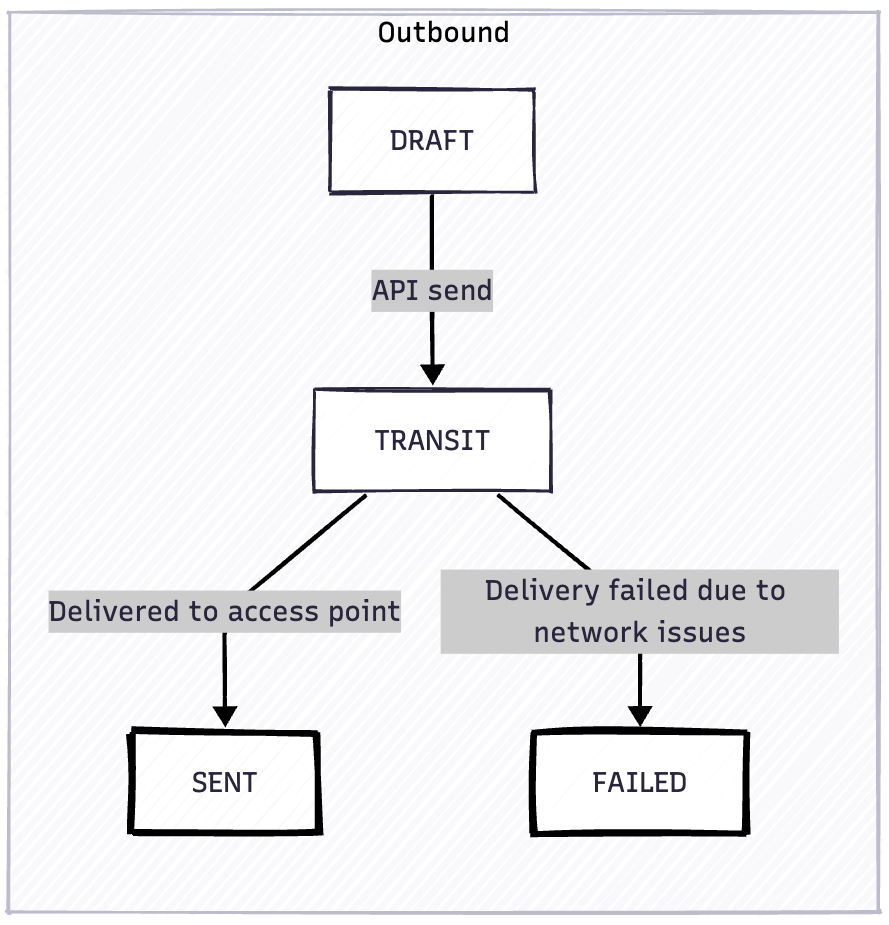 Documents in `TRANSIT` use automatic retry with exponential backoff (10 attempts with delays: 1, 2, 4, 8, 16, 32, 64, 128, 256, and 360 minutes) before transitioning to `FAILED`.
If a document reaches `FAILED` state, you can retry by calling `POST /api/documents/{document_id}/send` again.
Use webhooks to monitor delivery status.
## Common Use Cases
### 1. Full Invoice Cancellation
```json theme={null}
{
"document_type": "CREDIT_NOTE",
"invoice_id": "CN-2024-007",
"invoice_date": "2024-10-24",
"currency": "EUR",
"purchase_order": "INV-2024-001",
"note": "Invoice cancelled - issued in error",
"vendor_name": "Your Company BVBA",
"vendor_tax_id": "BE0123456789",
"vendor_address": "Main Street 123, 1000 Brussels, Belgium",
"customer_name": "Customer Company NV",
"customer_tax_id": "BE0987654321",
"customer_address": "Customer Lane 456, 2000 Antwerp, Belgium",
"items": [
// Include all line items from original invoice with same quantities
]
}
```
### 2. Product Returns
```json theme={null}
{
"document_type": "CREDIT_NOTE",
"invoice_id": "CN-2024-008",
"invoice_date": "2024-10-24",
"currency": "EUR",
"purchase_order": "INV-2024-001",
"note": "Product return - not as described",
"vendor_name": "Your Company BVBA",
"vendor_tax_id": "BE0123456789",
"vendor_address": "Main Street 123, 1000 Brussels, Belgium",
"customer_name": "Customer Company NV",
"customer_tax_id": "BE0987654321",
"customer_address": "Customer Lane 456, 2000 Antwerp, Belgium",
"items": [
{
"description": "Product A - Returned",
"quantity": 3,
"unit": "C62",
"unit_price": 100.00,
"tax_rate": "21.00"
}
]
}
```
### 3. Price Adjustments
```json theme={null}
{
"document_type": "CREDIT_NOTE",
"invoice_id": "CN-2024-009",
"invoice_date": "2024-10-24",
"currency": "EUR",
"purchase_order": "INV-2024-001",
"note": "Price adjustment - volume discount applied retroactively",
"vendor_name": "Your Company BVBA",
"vendor_tax_id": "BE0123456789",
"vendor_address": "Main Street 123, 1000 Brussels, Belgium",
"customer_name": "Customer Company NV",
"customer_tax_id": "BE0987654321",
"customer_address": "Customer Lane 456, 2000 Antwerp, Belgium",
"items": [
{
"description": "Volume discount adjustment",
"quantity": 10,
"unit": "C62",
"unit_price": 5.00,
"tax_rate": "21.00"
}
]
}
```
### 4. Service Cancellation
```json theme={null}
{
"document_type": "CREDIT_NOTE",
"invoice_id": "CN-2024-010",
"invoice_date": "2024-10-24",
"currency": "EUR",
"purchase_order": "INV-2024-001",
"note": "Service cancellation - pro-rata refund",
"vendor_name": "Your Company BVBA",
"vendor_tax_id": "BE0123456789",
"vendor_address": "Main Street 123, 1000 Brussels, Belgium",
"customer_name": "Customer Company NV",
"customer_tax_id": "BE0987654321",
"customer_address": "Customer Lane 456, 2000 Antwerp, Belgium",
"items": [
{
"description": "Consulting services - unused portion",
"quantity": 1,
"unit": "DAY",
"unit_price": 500.00,
"tax_rate": "21.00"
}
]
}
```
## Troubleshooting
### Credit Note Rejected
**Error**: `purchase_order is required for credit notes`
**Solution**: Always include the `purchase_order` field with the original invoice number to create a clear audit trail.
### Amount Mismatch Concerns
**Question**: "My credit note total is higher than the original invoice"
**Solution**: This can be valid if you're crediting the invoice amount plus adding a goodwill gesture or covering return shipping costs. Ensure your accounting system can handle this scenario.
### Customer Didn't Receive Credit Note
**Check**:
1. Verify the customer's Peppol ID is correct
2. Check document state: `GET /api/documents/{document_id}`
3. Review transmission report: `GET /api/documents/{document_id}/transmission-report`
4. Check webhook notifications for delivery status
## Next Steps
Learn about allowances and charges
Review invoice creation guide
Monitor credit note delivery
Explore all endpoints
Documents in `TRANSIT` use automatic retry with exponential backoff (10 attempts with delays: 1, 2, 4, 8, 16, 32, 64, 128, 256, and 360 minutes) before transitioning to `FAILED`.
If a document reaches `FAILED` state, you can retry by calling `POST /api/documents/{document_id}/send` again.
Use webhooks to monitor delivery status.
## Common Use Cases
### 1. Full Invoice Cancellation
```json theme={null}
{
"document_type": "CREDIT_NOTE",
"invoice_id": "CN-2024-007",
"invoice_date": "2024-10-24",
"currency": "EUR",
"purchase_order": "INV-2024-001",
"note": "Invoice cancelled - issued in error",
"vendor_name": "Your Company BVBA",
"vendor_tax_id": "BE0123456789",
"vendor_address": "Main Street 123, 1000 Brussels, Belgium",
"customer_name": "Customer Company NV",
"customer_tax_id": "BE0987654321",
"customer_address": "Customer Lane 456, 2000 Antwerp, Belgium",
"items": [
// Include all line items from original invoice with same quantities
]
}
```
### 2. Product Returns
```json theme={null}
{
"document_type": "CREDIT_NOTE",
"invoice_id": "CN-2024-008",
"invoice_date": "2024-10-24",
"currency": "EUR",
"purchase_order": "INV-2024-001",
"note": "Product return - not as described",
"vendor_name": "Your Company BVBA",
"vendor_tax_id": "BE0123456789",
"vendor_address": "Main Street 123, 1000 Brussels, Belgium",
"customer_name": "Customer Company NV",
"customer_tax_id": "BE0987654321",
"customer_address": "Customer Lane 456, 2000 Antwerp, Belgium",
"items": [
{
"description": "Product A - Returned",
"quantity": 3,
"unit": "C62",
"unit_price": 100.00,
"tax_rate": "21.00"
}
]
}
```
### 3. Price Adjustments
```json theme={null}
{
"document_type": "CREDIT_NOTE",
"invoice_id": "CN-2024-009",
"invoice_date": "2024-10-24",
"currency": "EUR",
"purchase_order": "INV-2024-001",
"note": "Price adjustment - volume discount applied retroactively",
"vendor_name": "Your Company BVBA",
"vendor_tax_id": "BE0123456789",
"vendor_address": "Main Street 123, 1000 Brussels, Belgium",
"customer_name": "Customer Company NV",
"customer_tax_id": "BE0987654321",
"customer_address": "Customer Lane 456, 2000 Antwerp, Belgium",
"items": [
{
"description": "Volume discount adjustment",
"quantity": 10,
"unit": "C62",
"unit_price": 5.00,
"tax_rate": "21.00"
}
]
}
```
### 4. Service Cancellation
```json theme={null}
{
"document_type": "CREDIT_NOTE",
"invoice_id": "CN-2024-010",
"invoice_date": "2024-10-24",
"currency": "EUR",
"purchase_order": "INV-2024-001",
"note": "Service cancellation - pro-rata refund",
"vendor_name": "Your Company BVBA",
"vendor_tax_id": "BE0123456789",
"vendor_address": "Main Street 123, 1000 Brussels, Belgium",
"customer_name": "Customer Company NV",
"customer_tax_id": "BE0987654321",
"customer_address": "Customer Lane 456, 2000 Antwerp, Belgium",
"items": [
{
"description": "Consulting services - unused portion",
"quantity": 1,
"unit": "DAY",
"unit_price": 500.00,
"tax_rate": "21.00"
}
]
}
```
## Troubleshooting
### Credit Note Rejected
**Error**: `purchase_order is required for credit notes`
**Solution**: Always include the `purchase_order` field with the original invoice number to create a clear audit trail.
### Amount Mismatch Concerns
**Question**: "My credit note total is higher than the original invoice"
**Solution**: This can be valid if you're crediting the invoice amount plus adding a goodwill gesture or covering return shipping costs. Ensure your accounting system can handle this scenario.
### Customer Didn't Receive Credit Note
**Check**:
1. Verify the customer's Peppol ID is correct
2. Check document state: `GET /api/documents/{document_id}`
3. Review transmission report: `GET /api/documents/{document_id}/transmission-report`
4. Check webhook notifications for delivery status
## Next Steps
Learn about allowances and charges
Review invoice creation guide
Monitor credit note delivery
Explore all endpoints